8. Designing an effective web based user experience

‘Experience’ – this word is probably important in every way of life also when we want to create a web page. It is simple to understand because try to imagine what is better for you and for potential customers – simple web page or complex web page? The answer is obvious. If you want to create a really good and simple web page you should read about few factors which can be helpful for you in this case. When we talk about web page we talk about whole structure and about whole design. Structure, colors, size, etc. does matter. When we have our web page ready and everything works we should analyse our ‘product’. If we do analysis we can have a lot of information which can improve final product which is web page. We can improve small parts of our web page or we can change something designs, methods or techniques but until we do not have analysis we are not able to know that something does not work and we should change it.

1.1 Explain the principles of a web-based user experience

User Experience Basics

Vitaly Friedman from the smashingmagazine has a good definition od user experience (UX) focuses on having a deep understanding of users, what they need, what they value, their abilities, and also their limitations. It also takes into account the business goals and objectives of the group managing the project. UX best practices promote improving the quality of the user’s interaction with and perceptions of your product and any related services.

Factors that Influence UX

At the core of UX is ensuring that users find value in what you are providing to them.  Peter Morville represents this through his User Experience Honeycomb.

Peter Morville’s User Experience Honeycomb notes in order for there to be a meaningful and valuable user experience, information must be useful, usable, desirable, findable, accessible, and credible.

He notes that in order for there to be a meaningful and valuable user experience, information must be:

  • Useful: Your content should be original and fulfill a need
  • Usable: Site must be easy to use
  • Desirable: Image, identity, brand, and other design elements are used to evoke emotion and appreciation
  • Findable: Content needs to be navigable and locatable onsite and offsite
  • Accessible: Content needs to be accessible to people with disabilities
  • Credible: Users must trust and believe what you tell them

Areas Related to Building the User Experience

UX is a growing field that is very much still being defined. Creating a successful user-centered design encompasses the principles of human-computer interaction (HCI) and goes further to include the following disciplines:

  • Project Management focuses on planning and organizing a project and its resources. This includes identifying and managing the lifecycle to be used, applying it to the user-centered design process, formulating the project team, and efficiently guiding the team through all phases until project completion.
  • User Research focuses on understanding user behaviors, needs, and motivations through observation techniques, task analysis, and other feedback methodologies.
  • Usability Evaluation focuses on how well users can learn and use a product to achieve their goals. It also refers to how satisfied users are with that process.
  • Information Architecture (IA) focuses on how information is organized, structured, and presented to users.
  • User Interface Design focuses on anticipating what users might need to do and ensuring that the interface has elements that are easy to access, understand, and use to facilitate those actions.
  • Interaction Design (IxD) focuses on creating engaging interactive systems with well thought out behaviors.
  • Visual Design focuses on ensuring an aesthetically pleasing interface that is in line with brand goals.
  • Content Strategy focuses on writing and curating useful content by planning the creation, delivery and governance behind it.
  • Accessibility focuses on how a disabled individual accesses or benefits from a site, system or application.
  • Web Analytics focuses on the collection, reporting, and analysis of website data.

1.2 Explain how website elements affect user behaviour

Joe Rinaldi from the impactbnd writes interesting things about how website elements affect user behaviour.

“Mobile web browsing overtakes desktop for the first time!”

Two years ago that headline was plastered across some of the most popular blogs in the industry. Today, we’re still in the midst of the mobile revolution and it shows no signs of slowing down.

For the first time ever mobile browsing has begun to lead the way we design for desktops.

With adults expected to spend an average of 3 hours and 23 minutes on voice mobile media, it’s no surprise to see the features we use every day making their way over to their stationary counterparts on desktop.

Being able to understand these mobile behaviors and how to effectively implement them in your web design can make a huge impact on your sites user experience.

Using features and trends people are familiar with eliminates a lot of the guesswork someone will need to do when using your site.

I’ve compiled some of the top mobile trends below to help give you a headstart on what exactly you should look into implementing on your site.

1. Hamburger Menus

Love them or hate them, hamburger menus are one of the most noticeable elements to make the jump from mobile to desktop.

If you’re not familiar with hamburger menus, it’s the name UI/UX designers use to refer to the triple bar icon some sites use in lieu of a traditional navigation menu.

While there’s plenty of arguments to be made for and against the use of hamburger menus, it all really boils down to the goals of your site and how you choose to implement it.

When done correctly, hamburger menus present users with a clean unobtrusive layout that lets them focus on the page’s content. Hamburger menus also eliminate “decision fatigue” or “analysis paralysis” which occurs when people are presented with too many options on a page.

Below, design agency, Telepathy uses a nice combination of the hamburger menu and a traditional menu to create a clean UI.

mobile-behaviors-web-design-1

They feature the most important links in their nav bar while neatly tucking away additional links in the hamburger menu. This approach does a really nice job setting a clear path for users to follow.

2. Sticky Elements Moving to the Bottom of Pages

Sticky elements are those that appear to be “stuck” to a specific part of a page.

While these are nothing new in web design, we usually see them at the top of a page. These elements can include things like sticky headers, cookie disclaimers, or “hello” bars promoting an offer.

The growth in mobile browsing has led to people designing with a special consideration for something known as the “thumb zone.”

This refers elements of a page that are easily accessible by a user’s thumb.

With this in mind, elements began to move from the top of the page down to the bottom so they could be clicked more easily.

Facebook, for example, does a great job of designing for the “thumb zone.”

In the screenshot below you can see they moved all of their apps navigation items to bottom of the screen. This gives them more attention and makes the links easier to click.

mobile-behaviors-web-design-2

Not only does this approach give users that feeling of familiarity that I mentioned before, it also provides a less distracting way to promote a message or offer.

The typical user reads from top to bottom, so placing these elements on the bottom of a page allows people to focus on the content, then interact with it easily if they’re ready.

The example below shows how Medium uses a sticky element on the bottom of the page to show users how many free reads they have left. Users can still easily read the content, then choose to sign up if they’re ready.

mobile-behaviors-web-design-2-2

3. Progressive Loading and Skeleton Screens

In order to combat the shorter attention span of users, we’re constantly trying to find improvements in site speed.

This is even truer when it comes to mobile, as it only takes a spotty signal and a few extra seconds of waiting for a user to lose interest and move on to the next page.

Recently on mobile, we’ve seen the use of progressive loading and skeleton screens become increasingly popular.

Progressive loading allows individual elements of a page to become visible as soon as they’ve loaded, rather than displaying everything all at once.

While the individual elements load, you’ll see a skeleton screen which is essentially a wireframe of the page. The example below is a skeleton screen from Facebook.

mobile-behaviors-web-design-3

The benefit of progressive loading and skeleton frames is that users feel like progress is being made, making the wait time feel shorter.

This trend has now made the jump over to desktop sites and has started replacing (or working in conjunction with) the age-old progress bars and spinners.

You can see sites such as Linkedin and apps like Slack already taking advantage of this technique.

mobile-behaviors-web-design-3-3

4. The Use of Emojis

Emojis burst into the phone scene in 2011 and have since become so prolific they even have their own movie.

With people peppering their texts and tweets with different emojis, it’s no surprise that marketers have taken this trend and found ways to work it into their marketing.

One area where marketers are seeing a lot of success with emojis is in email subject lines. Experian discovered that 56% of brands that used emojis in their subject line received higher open rates. Emojis help us save space in text limited areas by saying more with less.

Not only do emojis help us save space, they are easily recognizable, helping companies inject a little bit a personality and fun into their marketing.

At IMPACT we used this approach on our about us page with a friendly wave:

mobile-behaviors-web-design-4

5. Minimalism Style of Design

The minimalist style of design is based on the idea that “less is more.”

Minimalism and simplified color schemes were originally used on mobile sites in order to improve load times and avoid confusion and clutter on limited screen real estate.

Designers today are now taking this concept and expanded it to desktop sites, lead greatly by Google’s Material Design.

Implementing minimalist design helps give your users a clear focal point for each page.

The ample white space that many minimalist sites use makes it easier for users to digest information one section at a time. It also forces us as marketers to stop and really think about what’s absolutely necessary on a page and what’s just fluff.

One of my favorite examples is the homepage of the prototyping software Marvel App.

mobile-behaviors-web-design-5

Right when you get to their homepage, you’re greeted with a bold clear statement of what their software does and how to sign up.

As you scroll through the page, the site feels very open and clean. It’s not overly text-heavy yet you’re able to get all of the necessary information you need.

6. Onboarding Experiences for SaaS

User onboarding is no longer an experience limited to just apps and mobile sites; It’s being used by companies who offer unique services or software’s features that a user might not be familiar with; regardless of whether they’re on a mobile or desktop site.

Simply put, a user onboarding is a tool that introduces customers to specific elements of your services to ensure they find success it.

Some sites, such as Quora, use this strategy as a setup manual to get users up and running on their product.

mobile-behaviors-web-design-6

Other sites, such as Duolingo, use setup their onboardings to give you gentle reminders of the different features you can use in their software.

mobile-behaviors-web-design-6-2

These onboardings do an amazing job of reducing any friction or hesitation a user might have when first using your software.

They also give you the chance to really make a good first impression and delight your users right-off-the-bat.

Key Takeaway

As mobile continues to grow, we’ll likely see more and more trends like the ones mentioned above coming over to desktop sites.

So, keep an eye on your favorite apps and websites, and brainstorm how you may be able to use a similar behavior on your website.

Keeping an open mind to these trends can make all the difference when it comes to creating a better experience on your website.

source: https://www.mainstreethost.com/blog/5-site-design-elements-affect-user-behavior/
From time to time, you can actually judge a book by its cover. And when it comes to websites, you can almost always judge them by their covers.Your site’s overall aesthetic can make a world of difference to each individual user’s resulting experience. Despite how many calls-to-action, banners and contact forms you have, visitors will rarely bother to invest their time if those cleverly engineered facets don’t look good.

But which design elements can truly affect how a user interacts with a website, and what can be done to improve their experience? Let’s take a closer look.

Size

Yes, yes… size matters. A call-to-action that’s in 10 point font won’t resonate like the same verbiage does in 100 point font. Here’s the difference:

Different Sized Fonts

Boil down your most important message(s) and light those up for all to see. If you’re second guessing my advice, there’s a great deal of research to back this fundamental point up. In an eye tracking study conducted by Google and IBM, subjects were found to spend 34% more time on large fonts than small fonts.

It’ll generally be in your best interest to follow a hierarchical order of textual sizing – that is, sticking your strongest, most accessible headlines and calls-to-action to the largest font, and working your way down to a small size for the more in-depth reading.

And size applies to far more than just your verbiage. Consider what you’re trying to accomplish on any given page and scale your forms, fields, images, and navigation to accommodate those goals. A page that’s meant to pull in first-time visitors should likely air on the side of large, compelling visuals that catch the eye and sizeable (but sparse) text. In turn, as they navigate deeper, they’ll have the patience and qualified interest to indulge in longer swathes of smaller text, images and the like.

Color

When it comes to color, it’s smart to stick to a consistent palette. If you have a pre-existing logo, basing your site’s color palette on it will perpetuate your brand’s look and feel.

Designing with a specific color palette in mind will convey both a visually-sound and professional appeal to your viewers. When every page on your site presents a similar color scheme and uniform design elements, visitors can rest assured they’re in the right place.

Of course, different colors can have different psychological effects on viewers. Consider your brand’s personality and how you want your target audience to react when they visit; should they become excited, mellowed out, heated, curious, grave or humored? Construct an ambiance that reflects their best interests and wrangles their attention.

Keep in mind certain color combinations are hard on the eyes, and others carry unavoidable connotations. For example, avoid red with green, black with orange, and – for the love of God – green on yellow unless you’re purposefully aiming for a holiday theme.

Layout

The way you arrange your site’s content is just as important to user experience as the content itself.

Where does your navigation go: the top, the side, the bottom, the corner, or perhaps smack dab in the middle? Will a consistent header and/or footer house said navigation and provide contact information or special announcements? Does it make sense to settle one way or another based on your site’s purpose and the content you’re providing your users?
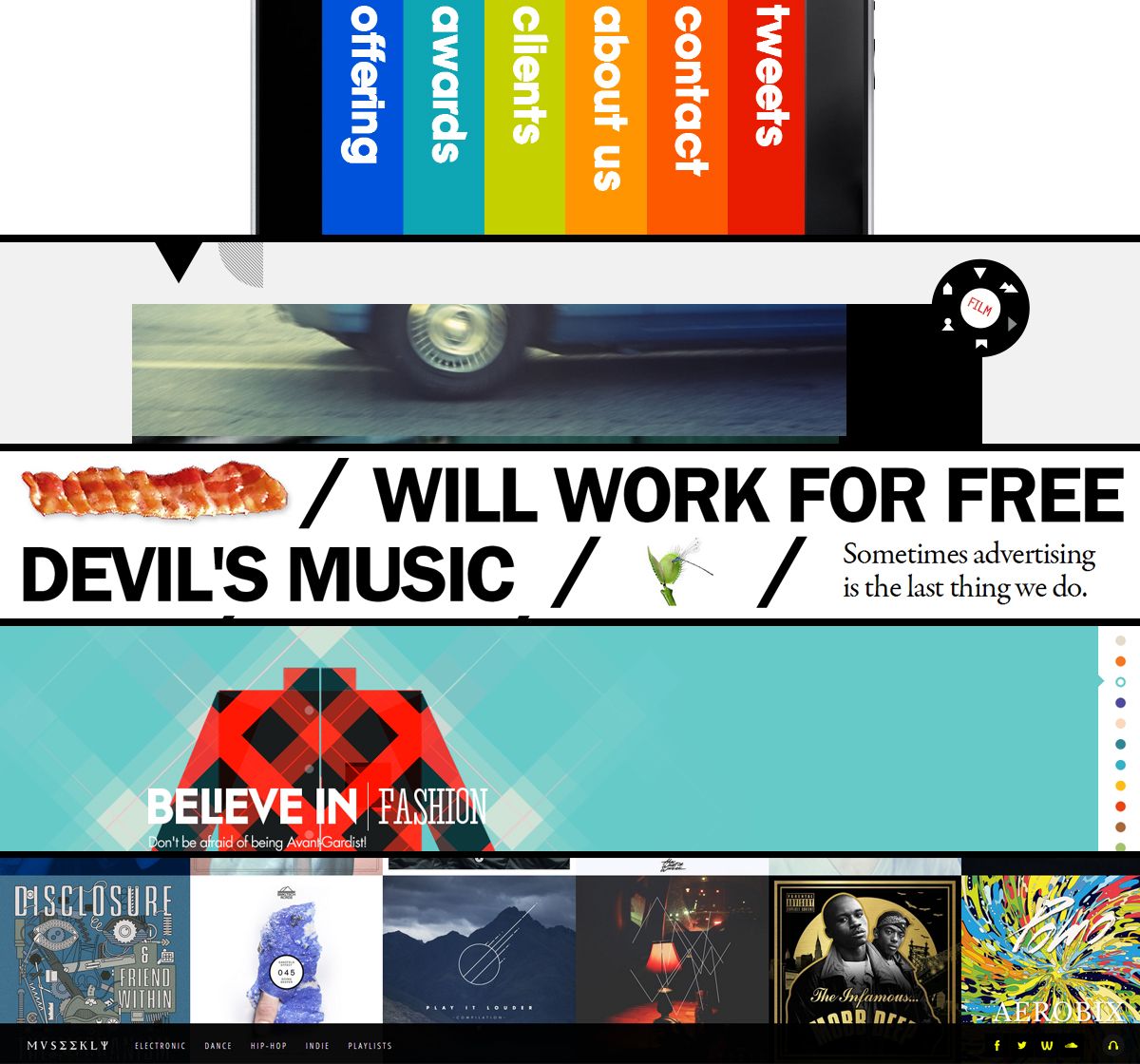
Layout

Here’s a preview of several very creative (and good-looking) site navigation schemes.

Once you’ve laid the foundation, it’s time to place the rest of your content. Here are some general pointers to keep in mind regarding layout, regardless of your industry and individual goals:

  • Create allure above the fold to captivate your visitors’ attention immediately. What’s the most compelling information that will capture and keep new eyes on your page? Arrange it front-and-center for the best user experience.
  • Integrate relevant visuals with your textual content, and use these visuals to point visitors in the right direction. Photos, illustrations, videos, animations, and statistical graphics will send your message effectively and prompt further interaction.
  • Give yourself room to expand. Sites grow as people and businesses grow, so build your site’s layout in a way that won’t limit your options for said expansion.

The next two categories are significant elements of layout, but are broad enough to break into their own categories as well.

Spacing

When it comes to user experience, the last thing on your mind may be the manner in which your content is spaced. Some would scoff at the mere mention of something as spacing, but it can make or break your user experience in certain cases.

Just ask yourself… if   my writing  was spacedlike so ,would   you havebothered  to   have read thisfar into  my   post?

I didn’t think so.

We all know what a neglected webpage looks like: early-2000s era scrolling banners and clip art images squashed together with seemingly extraneous text. It’s this type of flawed design that speaks volumes to the importance of spacing – whether it’s between images, paragraphs of text or even the kerning between individual letters.

Allow enough space for your text and images to breathe, giving viewers an experience that’s organized and easier on the eyes. Make sure you’re using text wrapping when appropriate, and double check for overlapping content if you’re pursuing a custom design. At the same time, avoid creating gaping areas of negative space that allude to missing content.

Consistently botched spacing looks nothing short of sloppy to your visitors. And once they’ve questioned the legitimacy of your site and/or business, they’re far more likely to spend their valuable time elsewhere.

Flow

A web page is defined by its content, and characterized by its flow.

We’re so used to navigating the same website layouts in the exact same way. But what happens when you break out of the norm and give today’s digital denizen a genuinely creative way to browse your site? The manner in which your content flows has potential to provide your users with a delightful and memorable experience.

Will they scroll from left to right, or top to bottom? Or will they travel inwards through a more interactive experience that deviates the norm?

And how about the flow of the content itself? It’s easy enough to paste together chunks of information as they come and arrange a page like so, but the haphazard way is not the best way.
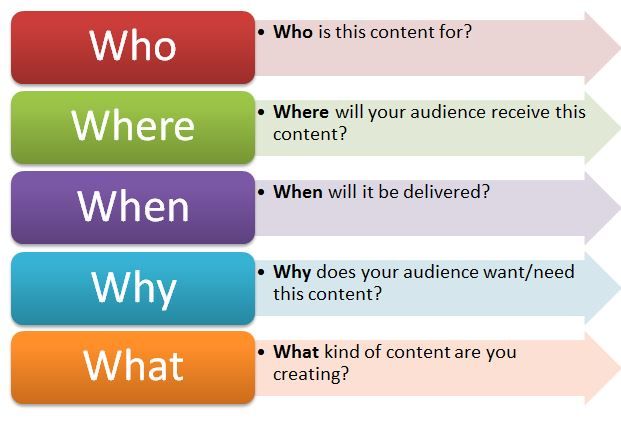
5 Ws of Content Strategy

Here’s a handy reference that can be used for any type of content creation.

Deliver your message in a way that makes sense. Step away from your preconceptions of what your site should look like, and into your target audience’s collective consciousness. Why did they come to your site in the first place? What reasons might they have for visiting this particular page? What sort of information do they want to see first, and how do they want to see it?

Answer these questions on a case-by-case basis, and odds are the difference will be reflected in improved traffic volume, conversions and social interactions.

1.3  Analyse user requirements

According to usabilitypartners we can understand how and why will people use your product? What are the most important features for users? Which functions are most central? How should they be structured?

Know the users – understand their needs…

Unknown user
Common misconceptions about user requirements:“We thought we knew what they needed…””Users don’t understand the possibilities in the future. There’s no point in asking them…”
  • Poorly specified user requirements are one of the most significant factors behind IT project failure.
  • A successful product or system requires a proper understanding of both user and organisational requirements – we help integrate and balance the two in the specification process.
  • Avoid over-reliance on internally generated requirements (what its believed that users want), as opposed to data from end-user requirements studies (what users actually need).
  • Usability Partners support development projects, bringing key user data into the design process and analysing user needs, their work practice, and the situations in which they work.

User requirements gathering and analysis

Photograph of people doing cardsort
Card sorting and Affinity diagramming workshops – two of several other techniques we use – particularly useful for information structuring (e.g. in navigation design)

The aim of our user-focused tools and methods is to provide a clear understanding of requirements as an early input to development projects. We help focus design work on those issues that are central to the success of a product or system in the eyes of the end-users.

Usability Partners is experienced with a range of requirements gathering and analysis techniques – we select those most appropriate to a given project situation. Whether end-users are professionals or consumers, located locally or around the globe, there are techniques for gathering their needs.

Typical requirements gathering and analysis methods include:

  • Surveys – both open-ended and focused surveys, conducted electronically or on paper.
  • Interviews – typically conducted face-to-face, but also over the telephone if deemed more appropriate.
  • Focus groups – whilst being poorly suited to evaluating a product, focus groups are useful for discussing possible user requirements and brainstorming ideas.
  • Field studies – observing the end-user situation and the environment in which a new product or system will be used is often extremely useful in understanding user needs.
  • Evaluation of an existing product – provides a range of useful information (even competitor products can be tested). Usability evaluation reveals and clarifies good and bad aspects of current solutions – valuable input to new design work.
  • Task analysis – a deeper analysis of users work with a system, useful for analysing how user’s work tasks should be supported by functionality in a system.
  • User personas and usage scenarios – concrete and illustrative data about typical users, their characteristics, usage situation, tasks and goals. Particularly useful in supporting early user interface design work.
  • Formulation of usability goals and overall design criteria – help focus and steer the design process, supporting the evaluation of early concepts, prototypes and final designs.

1.4 Evaluate the contribution of a website’s information architecture to the user experience

What is an Information Architecture?

Stavan Himal from the medium.muz claims that information architecture is all about organising the content in a way that it can be understood in an easiest manner.

In terms of digital design, information architecture is about organising the content of your websites, apps or software in a manner so that the users can understand and find the content they need and also help them to know where they are currently while using the service.

Information architecture means to divide a bunch of information into small pieces, labelling them and organising them in a way so that the information can be found easily and can be effective to use.

“Imagine yourselves as the architect, In this case, you create the blueprints of a site. You do the research and you organise the space based on the flow of people in and out of the building.”

It can be visualised as an intersection of the users, context and the content. As mentioned on Usability.gov, an IA can be referred as the ‘information ecology’ and visualised as a Venn diagram of users, context and the content.

Users: The audience, the people who are seeking information from your services

Context: In what terms you’re providing the information to your audience. Is it about the business goals, or about the technology or about the resources of how to create an IA

Content: As the name suggests, content means what are your providing them to read or access or to use. Are there some paragraphs of text, or the images or some videos or the quotes. Content is all about the value users are getting by using your service.

1_3epkrsgzx1jkt933l-nnyw

Defining IA as the intersection of Users, Context and Content using Venn Diagram

Why an Information Architecture is important?

In the field of digital design, information architecture can be mentioned as the back bone of the service you’re providing or it can be said that, an Information architecture is the foundation of the digital service and it helps to design the navigational context of your services and if the foundation is strong, the experience will be stronger.

The IA is the design of the information space to facilitate the intuitive access of the content.

How to create an Information Architecture and what are the common methodologies used in the process?

Some people relate the information architecture as part of library science and cognitive psychology or it can be said that an IA can be achieved through understanding the concept of Library Science and cognitive psychology.

Library Science
Library Science is mainly about categorising and cataloguing and we can use the same concepts while creating an Information Architecture. IA can be achieved by grouping (categorising) the pieces of content which are similar or the functions which has the same behaviour and later assigning them the values or the names (Cataloging) to find easily in the future.

Cognitive Psychology
Cognitive Science also plays a very important role in the creation of Information Architecture. There are many principles are involved in the cognitive psychology like,

Gestalt Principles
As per Interaction Design Foundation, Gestalt principles are the set of rules which describes that how our eyes perceives visual elements. They are used in creating optical illusions and some of the rules like principle of Similarity and proximity helps a lot to organise an information in a proper grouping and unified manner. To read more about this please refer to the article one Interaction Design Foundation.

Cognitive Load
While creating an IA, we always need to take care of the person who is going to use this information and how much information they can perceive or process in a given timeframe. It helps the Information Architects to design the information in a manner so that, they don’t provide a lot of information to the user at once.

Mental Models
Mental model defines that what user is already perceiving in his mind while reading or seeing a particular thing which is familiar to him. As per the article on UXBooth, ‘Information are easier to discover when it is in a place that matches the mental model of the user of where it should be’

1_u69jkyaytrerfal2tcdnug

For an example, while visiting a website of the company, user wants to know more about the company and from many website they would have seen, the information about the company generally lies in the ‘About’ page of the company which can be accessed by ‘About’ tab from the website.

Apart from these principles there are many other things like recognizing the patterns and the visual hierarchy which affects a lot to the mental model of the user about how they perceive the information and all these things should be taken care of while designing an IA.

How an IA is helpful?

“The goal is to create an easy experience that is engaging and instils a lasting impression on the user, It’s the difference between coming away from a digital experience and thinking “That was easy” to ‘Whoa. That was cool’.”

As I mentioned above, IA is the backbone of the digital service you’re creating. IA really helps to organize the content in a proper and easy way for the users to understand and at the same point of time, it helps to create the navigation and the hierarchy of the digital service.

As we all know, navigation is one of the most important component of the digital service we’re creating and the hierarchy as well. Good navigation menu helps people to move easily throughout the site and hierarchy helps to define the structure of the content. And so that, an IA is the most important part to decide that how the information is defined and accessed on a particular service.

Conclusion
As we are dealing with a lot of different types of content like text, images, videos etc. having a good IA is becoming more and more important to enhance the user experience of the service. If the content is well organised, the IA will be well prepared and it will ultimately enhance the experience of the users using your product. It is really important to think about every part of our web page and create everything as easy as possible. If customer see nice and clear web page probably will be there more time and if it is a shop he/she can spend more money. The point is to have attractive and easy web page.

References:

https://www.smashingmagazine.com/2008/01/10-principles-of-effective-web-design/ – accessed on 24.01.19

https://www.impactbnd.com/blog/mobile-behavior-influence-on-website-design – accessed on 24.01.19

http://www.usabilitypartners.se/services/user-requirements-analysis.php – accessed on 24.01.19

https://medium.muz.li/information-architecture-and-its-importance-in-user-experience-design-e5c9c6ca80e9 – accessed on 24.01.19


Unit 5.2 How to set up projects.

When we want to set up project we also should consider a few things. Here are also a lot of things to consider but when we do it, it can be helpful for our project and finally for us. Everybody would like to save time and money so let’s take a look how can we do it.

1_svpeihhdkqwphc38yzywna
Image source: https://hackernoon.com/how-to-build-a-project-management-organization-in-90-days-783b907f4a12

On the wrike.com we can find useful information about that  set up some of project in a proper way.

Step 1: Identify & Meet with Stakeholders. A stakeholder is anyone who is affected by the results of your project plan.

Step 2: Set & Prioritize Goals.

Step 3: Define Deliverables.

Step 4: Create the Project Schedule.

Step 5: Identify Issues and Complete a Risk Assessment.

Step 6: Present the Project Plan to Stakeholders.

2.1 Consideration when reviewing project proposals.

Christina M. Sax from the evolllution.com writes about when we will be decided to set up particular project we should consider it carefully. Here we have a few important points to consider. We should think about: purpose, impact, costs, execution, assessment, risk.

1. Purpose:

The foundational consideration for any innovation proposal goes to its core purpose. What are the goals of the project and why would we want to adopt it? What problem are we trying to solve, what change are we trying to effect, what advancement are we trying to achieve through the project? What are the strategic, operational, and/or moral imperatives for engaging in the project, and for doing so now rather than waiting?

As always, the decision maker will ask how the proposal serves the institution’s mission, vision, values and strategic plan.

2. Impact:

Both informing and following naturally from purpose is the impact of the proposed project. Senior decision makers will want to know the direct/tangible and indirect/intangible benefits of the project across numerous key areas.

The impact on student access, success, retention, timely degree completion and gainful employment are always of concern as they go to the core mission of the institution. What also are the impacts on institutional effectiveness, efficiency, cost savings, revenue generation, accreditation, reputation and brand? How will the outcomes affect individuals and relationships—faculty, staff, and administrators of the internal community, as well as alumni, and the broader external community and partnerships? Beyond the intended goals, what are the possible unintended negative consequences on the proposal’s target and other elements of the institution?

3. Costs:

Contrary to popular belief, cost is not the primary driver for decision makers. Cost considerations are significant, but the context of purpose and impact can mitigate cost barriers. Direct and tangible costs are relatively straightforward to predict and estimate.

Harder to do, and often ignored, are the direct and intangible dollar and time costs of human power in time and effort, as well as technology and facilities usage. Harder still to estimate are the costs of positive and negative impacts on perceptions, morale, reputation, awareness and brand.

Senior decision makers will also want to know if the goals of the project can be accomplished in another way with less or shared resources, or in less time with less effort or human power. For example, can the project be added to, or an extension of, another project, operation, or set of responsibilities? The parallel consequences of funding the proposal can be addressed by answering strategic questions such as: What else can’t we do if this proposal is funded? From what other activities will dollars, people, time and effort be diverted to support this proposal?

4. Execution:

Decision makers are acutely aware that the best reasoned and planned innovation project can fall short due to an ineffective execution, and indeed have been burned by such occurrences in the past. To ensure success and protect the best use of institutional resources, decision makers will want to know who will be involved and impacted by the project, in its planning, execution, assessment, sustainability and outcomes. A detailed timeline for the planning, launch, and assessment and evaluation phases is important, and should also indicate when we might first begin to see the impact of the project.

An often-overlooked point is whether the project’s activities are sustainable under the proposed and likely future conditions and levels of funding. Also of interest will be whether the implementation of the project provides the opportunity to explore creative, instructive, relevant, adaptable, interoperable, or new models for other situations and problems.

5. Assessment:

The assessment, evaluation and accountability plan is a critical consideration as it will allow us to know whether the project has achieved its goals, been successful in additional ways, and been a worthy investment of institutional resources. On the front end, decision makers want to know what data and research indicate that the project is needed, has validity, is feasible, has a reasonable chance of success, and which other institutions or groups have previously attempted the project and their experience in doing so.

Thinking with the end in mind, the proposal should describe the eventual measures and indicators of success and accountable units for each, taking into consideration quantitative and qualitative aspects, direct and indirect indicators, leading and lagging indicators, external benchmarks and internal targets, and return on investment and return on value estimates. The assessment plan would do well to address the maximization of institutional resources by answering strategic questions such as: Are there interim milestones of success, and can they stand alone and be sustained in the absence of completion of the full project? How and when will we know if the project is unsuccessful? Are their opportunities for mid-course corrections and adjustments? How should we proceed if the project is not successful?

6. Risks:

Decision makers are also interested in the risks associated with the innovation project, well beyond the simple risk of resources wasted on an unsuccessful initiative. Risks come in many forms, including those that are foreseeable and preventable, unpredictable and uncontrollable, internal and external. Such risks have the potential to impact strategic, operational, financial, compliance, reputational, systemic and localized activities, organizational effectiveness, morale, and governance aspects of the institution.

Taking these into consideration, an overall level of risk assessment can be estimated and should be stated in the proposal—insignificant, low, moderate, high, or extreme. Thinking ahead, decision makers will want to know how the institution will handle specific potential problems and scenarios. Parallel considerations include the potential risks and costs for students, other members of the university community, and the institution if the project isn’t approved and pursued.

2.2 How to set up clear goals for projects.

If we want to set up clear goals for projects we should remember about following points. They are described in a good way by Alexandra Lamachenka on the blog.capterra.com.

1.  Have precise goals.

Meet Murphy’s Law, which claims that when something might go wrong, it will.

In the case of project planning and goal setting, consider this statement: “If there are several ways to understand the task, then someone will understand it improperly.”

While setting goals, you should make them as accurate and specific as possible to avoid misinterpretation. Writing goals on paper or (even better) in an easily-accessible electronic format is also good practice. Fortunately, there are many types of project management software available to help achieve this end.

Examples of Goals:

Incorrect Goal: Make a cross-browser layout of the http://www.site.com

Correct Goal: http://www.site.com must be equally displayed in browsers IE6 +, Opera 6+, and Firefox 2+

Incorrect Goal: Make a valid layout of the http://www.site.com

Correct Goal: http://www.site.com must completely pass check validators w3c.org (http://www.w3.org/QA/Tools)

2. Agree on goal meanings instead of details.

You do not need to go into every minute detail of every goal. You just have to agree on each goal’s meaning. It is important that the team and the product owner understand each backlog element in an equal way.

Measurable Goals

3. Measure your achievements.

Measurable goals bring several benefits.

First, if there is a numerical measure of achievement, you know exactly at what stage of work you are and how much is left to do.

Second, you know exactly how much you have done. Sometimes, it is useful reflect on achievements to boost morale.

Finally, at the end of the workday, you and your teammates will be able to calculate by what percentage you achieved your target.

Examples of Goals:

Incorrect Goal: Increase traffic on the site.

Correct Goal: The traffic on the site must be 2,000 visitors per day.

Incorrect Goal: Make every visitor to buy more.

Correct Goal: Increase the sum of an average check by 10%.

The presence of metrics are important, and not only for formulation of backlog elements; they also allow the project manager to assess the size of the goal element. Although latest trends abandon numerical estimates in goal setting, it is impossible to make the process of project planning sufficiently accurate without them.

4. Form implementation intentions instead of goal intentions.

When setting project planning goals, project managers usually create succinct goals. Yet sometimes they fail because of changing requirements and situational cues.

Compare Goals:

Goal Intention: The feature must be released by May 20.

Implementation Intention: If the feature is still under development on May 5, an extra developer should be invited to the project.

With the focus on implementation intentions strategy, you can specify how a person should behave by predefining if-then situations. In this case, risk management is already taken care of, and there is a clear path to respond to negative events.

Attainable Goals

5. Set goals in accordance to your team members’ strengths.

Each person has a unique set of knowledge and skills, so it is necessary to select the appropriate goals for individual people. Referencing the skills and knowledge of the person, goals can be categorized:

  • Unreachable: The goals are unrealistic.
  • Elusive: The goals are unclear.

First of all, you should assign difficult or complicated goals to experienced and ambitious employees. The harder the goal, the greater the sense of achievement.

Good goals look like this:

  • Achievable: These goals correspond to the knowledge and skill level of the performer. For example, to draw the layout design of the approved site outline and brief in one day. Such tasks are necessary for respite between more difficult tasks and to develop self-confidence.
  • Easily accessible: These goals do not correspond to the competence of the employee. Reaching them does not give any sense of satisfaction for an employee. For example, to draw the button for a form in the specified style in a day. It is desirable to entrust such goals only to new employees to integrate them into the team.

The general conclusion is that it is necessary to alternate accessible and elusive goals. Using agile methodologies, when a team evaluates backlog items, such alternation is obtained in a natural way.

6. Set Learning Goals Instead of Performance Goals.

Most project managers measure goal achievements by learning metrics, but not performance metrics. The difference is that performance goals focus on the final result. In contrast, learning goals focus on the process itself and answer the question, “How can I reach this goal?”

Why is it important to focus on learning goals?

Surprisingly, learning goals are more likely to be achieved. Usually, when people face performance goals (these goals answer the questions like, “Can I outperform others?”), they focus on the end result and have a strong apprehension of failure. Doing so decreases their motivation and stops them from completing goals collaboratively.

With learning goals, people are able to devote their cognitive resources to a second task with minimal impact on performance.

Relevant Goals

7. Keep goals inspiring for the team.

The relevance of goals should be considered from two sides: goal relevance for the performer and for the company. Goal relevance (significance) for the team member is closely connected with his or her own set of personal motivations. For example, a research project can and should be given to an employee who enjoys learning new things, and wouldn’t be great for a programmer who would rather just code.

8. Keep goals relevant for the whole team.

Granted, when the team realizes that a goal is important, they’ll put in more effort when compared to “unimportant” goals.

And what can the team do if the goal is prioritized? Focus on efficiency. “Efficiency,” in this case, can be measured by a deadline, the final product, and the cost of work.

Time-Based Goals

9. Set concrete goal deadlines from urgency to availability.

When discussing dates for goals, you should remember one more empirical law called “Parkinson’s Law,” which states, “Any work expands so as to fill the time available for its completion.” If a task doesn’t have a deadline, immediate tasks displace it, and the chance that somebody ever gets around to it decreases. Thus, when setting any goal, always set a deadline.

The urgency of your goals is closely linked to goal-completion attainability. Let me show you why.

Examples of Goals:

Incorrect Goal: Make on the website the section “Contact Us” for a demonstration to the client by tomorrow.

Correct Goal: Make on the website the section “Contact Us” for demonstration to the client by noon 6/10/2016.

These deadline concepts integrate into Scrum. Iterations always have a fixed size and everyone knows precisely when will be a demonstration of sprint results.

10. Keep operational goals small while continuing to set high goals.

One of the SMART project planning tips is that operational goals and high-level goals should be clearly separated. Keep the low-level goals on which you are working small and achievable. This allows you to track the progress of the whole project and instantly make decisions based on the performance metrics.

But when setting ambitious goals, you assume that your colleagues have an ability to meet them, do not have any conflicting goals that can influence the result, and, finally, are moving in the same direction.

2.3 Project resource requirements.

Every project need a resources so we should keep it in our mind all the time – these information we can find on wikipedia.org and these information are important.

In project management, resources are required to carry out the project tasks. They can be people, equipment, facilities, funding, or anything else capable of definition (usually other than labour) required for the completion of a project activity. The lack of a resource will therefore be a constraint on the completion of the project activity. Resources may be storable or non storable. Storable resources remain available unless depleted by usage, and may be replenished by project tasks which produce them. Non-storable resources must be renewed for each time period, even if not used in previous time periods.

Resource scheduling, availability and optimisation are considered key to successful project management.

Allocation of limited resources is based on the priority given to each of the project activities. Their priority is calculated using the Critical path method and heuristic analysis. For a case with a constraint on the number of resources, the objective is to create the most efficient schedule possible – minimising project duration and maximising the use of the resources available.

2.4 How roles and responsibilities are allocated within project teams.

On the sielearning we can find information about that a really good team leader knows needs, requirements, team’s capabilities and also team’s weakness. It is very important thing to allocate responsibilities and roles between team members.

Team Leaders need to allocate roles to team members in such a way that the roles are coordinated to achieve the team’s goals and that team members take responsibility for their individual roles. Allocating appropriate roles and coordinating these roles can lead to increased morale and motivation.

There are a number of factors that Team Leaders need to consider when allocating roles to ensure that the team is effectively meeting its goals. Team Leaders need to ensure that team members:

  • Understand their roles
  • Understand the roles of their team mates
  • Understand how the roles interrelate in the achievement of the team’s goals
  • Have authority to coordinate activities with team mates

2.5 Project communication needs

2020projectmanagement claims that communication is important everywhere also in the project management. Good project communication can help with achieving particular goals within our project.

Project leadership calls for clear communication about goals, responsibility, performance, expectations and feedback.

Successful project management communication is about being there for everyone, being in touch with the real challenges of the project, understanding the real issues within the team who must deliver the project as well as understanding the issues of the sponsors who the team delivers the project for. Being present, visible and engaged with everyone is important – during the good times and the challenging times.

Communication is not only about speaking to and hearing from people, it’s about understanding the complete message.

2.6 Possible risks to successful completion of projects.

Very important thing is to be aware of possible risks which we can meet on our way within project. Is always good to know possible risks and about that we can read on the project-management.com.

The most common project risks are:

  • Cost risk, typically escalation of project costs due to poor cost estimating accuracy and scope creep.
  • Schedule risk, the risk that activities will take longer than expected. Slippages in schedule typically increase costs and, also, delay the receipt of project benefits, with a possible loss of competitive advantage.
  • Performance risk, the risk that the project will fail to produce results consistent with project specifications.

There are many other types of risks of concern to projects. These risks can result in cost, schedule, or performance problems and create other types of adverse consequences for the organization. For example:

  • Governance risk relates to board and management performance with regard to ethics, community stewardship, and company reputation.
  • Strategic risks result from errors in strategy, such as choosing a technology that can’t be made to work.
  • Operational risk includes risks from poor implementation and process problems such as procurement, production, and distribution.
  • Market risks include competition, foreign exchange, commodity markets, and interest rate risk, as well as liquidity and credit risks.
  • Legal risks arise from legal and regulatory obligations, including contract risks and litigation brought against the organization.
  • Risks associated with external hazards, including storms, floods, and earthquakes; vandalism, sabotage, and terrorism; labor strikes; and civil unrest.

2.7 How to mitigate for possible risks.

Everytime we should try to mitigate our risk. In my opinion is a permanent process which we have to do within our project. According to the strategyex we have following points which are linked with mitigation for possible risks.

1. Clarify The Requirements
What is it that you want to achieve with this project? Knowing that, and having true, deep clarity about that, is a huge mitigating factor for risk. It eliminates all the ‘we didn’t know what we were doing,’ and ‘you never said’ type risks that relate to scope.

Make full use of feasibility studies, workshops and user groups to test out the ideas before making a full commitment. Agile techniques can ensure end users and clients are engaged at every step of the way, feeding into the outcomes and making sure that what is delivered is really what is wanted.

How To Do It: Hold workshops. Interview stakeholders. Produce a comprehensive scope document and project brief, even if it takes much longer than you wanted to spend on this exercise. It will pay off in a big way if you get it right.

2. Get The Right Team
People introduce all kinds of risk to a project, largely due to their availability and skills. People with inadequate skills make your project take longer because they are slower. People who aren’t available when you need them also impact your project timescales.

If possible, ringfence the resources that you need into the team. This mitigates a lot of the people-related risks. The highest priority projects should attract and retain the best resources in the company (and interpret ‘best’ to mean whatever is most appropriate for your project: person with the most Java skills or whatever).

How To Do It: Use resource allocation techniques to identify the resources you require for the project and then to secure them. Make sure that you know when your resources are available for project work and book their time accordingly. Plan around them if you have to because it’s better to know now that they aren’t around than to have to push your project delivery back by 2 weeks because you weren’t aware.

3. Spread The Risk
Don’t try and dump all the risk on one person or group. Yes, risk transference is a recognised and useful risk management strategy, but it has to be used with caution. Mitigating your own risk by dumping it on someone else isn’t always the best approach.

For example, you can transfer risk to another party but that might incur a great deal of cost (through increased supplier prices or insurance) which in many cases isn’t the most appropriate use of company funds.

How To Do It: Quantify the risk. If you can’t quantify it, how can you put a financial measure on it to enable transference? Think about cost of transfer and likelihood of occurrence. Look for ways to manage risks jointly with contractors or other stakeholders to spread out the actions and also the impact should the risk occur.

4. Communicate and Listen
There is another way that people add risk to a project: through their actions when they are overlooked as stakeholders. I was speaking the other day to a management consultant in Canada who told me about a bridge that was built and then torn down due to lack of communication between local and national government bodies.

Communicate widely, consult widely and listen to the responses you get. These can help you identify residual risks and strategies to engage more effectively with the stakeholders concerned.

How To Do It: Plan your communications and take third parties into account too. Consumer, environmental or other external groups can have a huge impact on your project (positive and negative) so involve them early and consistently.

5. Assess Feasibility
Make use of feasibility studies and prototypes to test out ideas and solutions before you move to a full build. This is a simple way of de-risking a project because you can use this early stage as a test bed for checking your concepts, methodology and solution.

How To Do It: Break your project down into phases and include time at the beginning for a feasibility or investigation stage. This is a short period of time where you can fully scope out the initial underpinning or enabling work and test out your solution in a limited way prior to a full rollout. The learning can be incredibly helpful for shaping the rest of the project, and it can prove (or disprove) the business case without having to commit the full investment.

6. Test Everything
Experienced project managers will tell you that when project timescales are under pressure, testing is often the task that gets cut.

Don’t let that happen. Testing is an important part of making sure that your project risk is lower and manageable. Testing helps flush out problems that might bring the project to a standstill later. Test everything: training materials, implementation plans, and obviously software and the deliverables. Test frequently and allow longer than you expect.

How To Do It: It’s probably not a popular view but I would estimate the time needed for testing and then double it. That’s the time I would put in my plan for the task. In my experience testing is vastly underestimated, often because people forget that testing is cyclical and requires time to fix the bugs before you can test it again. Estimate carefully and have dedicated schedule contingency for testing.

7. Have A Plan B
You’ve planned out everything and your risk mitigation strategies are all in place. And still you hit a problem that you hadn’t foreseen. Don’t worry. It happens.

The best way to plan for the unplannable is to have alternatives in your back pocket. This could be:

  • Contingency funds
  • Float in the plan
  • Additional resources on standby
  • Options to break the project into segments and/or reduce scope

A Plan B isn’t something that you particularly set out to want to use, but it’s there as a cushion should any of your risks materialise in ways that you didn’t expect or new risks come along that took everyone by surprise.

How To Do It: Agree tolerances and contingency with your sponsor before the project starts. Talk about what additional funding you can secure to deal with unforeseen issues and how you will access this when the time comes. Having these discussions can save time if you need the funding and also act in themselves as a mitigation strategy through raising awareness of things like scope creep.

Conclusion

In summary we should do everything to achieve our goals. Probably it will be quite difficult process but after that it should be beneficial for us. We should think about: purpose, impact, costs, execution, assessment, risk. Good project manager should understand different roles of teammates and should coordinate everything in a good way. Communication it is also really important thing when we want to coordinate our project. Good communication means good results. Another important thing is mitigation of possible risks. All the time we should be aware of possible risks and do everything to prevent it. If we want to manage our projects we can use a lot of tools which can be really helpful for us. It depends on us which and how many tools will we use. Before we start something is a good to test it and check that everything is working. The last important thing is to have a plan B if something will be wrong. When we have plan B we will not be surprised and we can start another method to achieve our goals.

References:

https://www.wrike.com/blog/foolproof-project-plan/ – accessed on 11.01.19

https://evolllution.com/revenue-streams/market_opportunities/six-key-considerations-for-innovative-proposals/ – accessed on 11.01.19

https://blog.capterra.com/10-smart-goal-setting-best-practices-for-project-planning/ – accessed on 11.01.19

https://en.wikipedia.org/wiki/Resource_(project_management) – accessed on 11.01.19

https://sielearning.tafensw.edu.au/toolboxes/toolbox316/ip/ip_c02.html – accessed on 11.01.19

http://2020projectmanagement.com/resources/communication-management/communication-the-key-to-successful-project-management – accessed on 11.01.19

https://project-management.com/types-of-risk-in-project-management/ – accessed on 11.01.19

https://www.strategyex.co.uk/blog/pmoperspectives/7-ways-to-mitigate-risk-on-projects/ – accessed on 11.01.19


Unit 5.1 Why organisations use project management

At the beginning I would like to say that in different sources we can find different principles of project management but some of them are the same everywhere.

Project management is really important and it can save you a lot of costs and time. This report will demonstrate the importance of a good project manager to think about Business justification, defined roles and responsibilities and manage exceptions. The report will show how clear project management should be defied by stages, focus on products and learn from experience.

which affect the project and how each action can be associated with the entire project. In this report, I will try to describe the principles of project management and benefits of project management to organisations and individuals.

Everything that is associated with a project should be important for us and we should think about each action. If we consider everything, every step, every process it can improve our project. If we do it the results should be better than if we will do nothing.


pm-training-principles-knowledgehut

image source: http://www.virtualprojectconsulting.com/discover-the-basic-principles-of-project-management-training/

1.1 The principles of project management.

We can find the basic principles of project management.

Project management is a composite activity with multiple dimensions. Depending on the type and class of project, this management activity can be very complex. In a nutshell, project management is the discipline of planning, organizing, securing, managing, leading, and controlling resources to achieve specific goals.

The very basics of project management are as follows: a project is a temporary endeavor with a defined beginning and end (usually time-constrained, and often constrained by funding or deliverables) that an organization takes to meet unique goals and objectives, typically to bring about beneficial change or add value.

The primary challenge of project management is to achieve all of the project goals and objectives while honoring the pre-defined constraints. The primary constraints are scope, time, quality, and budget. The secondary—and more ambitious—challenge is to optimize the allocation of necessary inputs and integrate them to meet pre-defined objectives.

For a successful project, the following project management principles are necessary assets when charting a path to completion. These principles of project management can be applied to any level or branch of a project that falls under a different area of responsibility in the overall project organization:

  • Project structure
  • Definition phase
  • Clear goals
  • Transparency about project status
  • Risk recognition
  • Managing project disturbances
  • Responsibility of the project manager
  • Project success

Project Structure

Project management typically revolves around three parameters – Quality, Resources, and Time. A project structure can usually be successfully created by considering:

1. Project Goal

An answer to the question “What has to be done” is usually a good starting point when setting a project goal. This question leads to the project structure plan. This plan consists of work packages which represent enclosed work units that can be assigned to a personnel resource. These work packages and their special relationships represent the project structure.

2. Project Timeline and Order

A flowchart is a powerful tool to visualize the starting point, the endpoint, and the order of work packages in a single chart.

3. Project Milestones

Milestones define certain phases of your project and the corresponding costs and results. Milestones represent decisive steps during the project. They are set after a certain number of work packages that belong together. This series of work packages leads to the achievement of a sub-goal.

Definition Phase

The definition phase is where many projects go wrong. This can happen when no clear definition, or when the definition is muddled due to the involvement of too many stakeholders. Successful definition must involve the entire team at every step to facilitate acceptance and commitment to the project.

Clear Goals

The project manager is responsible for the achievement of all project goals. These goals should always be defined using the SMART paradigm (specific, measurable, ambitious, realistic, time-bound). With nebulous goals, a project manager can be faced with a daily grind of keeping everything organized. It will work decidedly to your advantage to clearly define goals before the project begins.

Transparency About the Project Status

Your flowcharts, structure plan, and milestone plan are useful tools to help you stay on track. As project manager, you should be able to present a brief report about the status of the project to your principal or stakeholders at each stage of the project. At such meetings, you should be able to give overviews about the costs, the timeline, and the achieved milestones.

Risk Recognition

It’s the duty of the project manager to evaluate risks regularly. You should come into every project with the knowledge that all projects come with a variety of risks. This is normal. Always keep in mind that your project is a unique endeavor with strict goals concerning costs, appointments, and performance. The sooner you identify these risks, the sooner you can address negative developments.

Managing Project Disturbances

It’s not very likely that you have enough personal capacity to identify each single risk that may occur. Instead, work to identify the big risks and develop specific strategies to avoid them. Even if you’re no visionary, you should rely on your skillset, knowledge, and instincts in order to react quickly and productively when something goes wrong.

Responsibility Of The Project Manager

The Project Manager develops the Project Plan with the team and manages the team’s performance of project tasks. The Project Manager is also responsible for securing acceptance and approval of deliverables from the Project Sponsor and Stakeholders. The Project Manager is responsible for communication, including status reporting, risk management, and escalation of issues that cannot be resolved in the team—and generally ensuring the project is delivered within budget, on schedule, and within scope.

Project managers of all projects must possess the following attributes along with the other project related responsibilities:

  • Knowledge of technology in relation to project products
  • Understanding Management concepts
  • Interpersonal skills for clear communications that help get things done
  • Ability to see the project as an open system and understand the external-internal interactions

Project Success

Project success is a multi-dimensional construct that can mean different things to different people. It is best expressed at the beginning of a project in terms of key and measurable criteria upon which the relative success or failure of the project may be judged. For example, some generally used success criteria include:

  • Meeting key project objectives such as the business objectives of the sponsoring organization, owner or user
  • Eliciting satisfaction with the project management process, i.e., the deliverable is complete, up to standard, is on time and within budget
  • Reflecting general acceptance and satisfaction with the project’s deliverable on the part of the project’s customer and the majority of the project’s community at some time in the future.

On the projectsmart website, Simon Buehring writes about  the Seven principles of project management.

  1. Business justification: every project should lead to a worthwhile return on investment. In other words, we need to understand the benefits that a particular project will bring, before committing ourselves to any significant expenditure. During the life cycle of a project, however, circumstances can change quickly. If at any point it becomes clear that a return on investment is no longer feasible, then the project should be scrapped and no more money wasted.
  2. Defined roles and responsibilities: everybody working on the project needs to understand the nature of their involvement: for what is each person responsible, and to whom are they accountable? Without clear roles and responsibilities, nobody will know precisely what he or she is supposed to be doing (and everybody will pass the buck at the first sign of trouble). In such a chaotic environment, the progress of the project will be seriously jeopardised.
  3. Manage by exception: project sponsors should avoid getting too bogged down in the day-to-day running of projects and instead allow the project manager to concentrate on this area. Micro-management by a sponsor is a hindrance, not a help. Project sponsors should set clear boundaries for cost and time, with which the manager should work. If he/she cannot provide the agreed deliverables within these constraints, concerns must be escalated to the sponsor for a decision.
  4. Manage by stages: break the project up into smaller chunks, or stages. Each stage marks a point at which the project sponsor will make key decisions. For example, is the project still worthwhile? Are the risks still acceptable? Dividing a project into stages, and only committing to one stage at a time, is a low risk approach that enables the sponsor to manage by exception.
  5. Focus on products: it is vital that clients and customers think carefully about the products, or deliverables, they require, before the project begins. The clearer they can be about their requirements, the more realistic and achievable the plans that can be produced. This makes managing the project much easier and less risky.
  6. Learn from experience: don’t risk making the same mistakes on every project; consider why certain aspects went well or badly, then incorporate the lessons learned into your approach to your next project. Humans have an amazing capacity to learn, but when it comes to repeating errors made during previous projects, we all too often fail to learn the lessons.
  7. Tailor to suit the environment: whatever project management methodology or framework you favour, it must be tailored to suit the needs of your project. Rather than blindly following a methodology, the project manager must be able to adapt procedures to meet the demands of the work in hand. How you plan on a two-week project is likely to be very different from how you plan on a two-year project.

The project management principles discussed here can be applied universally, irrespective of language, geography or culture. These principles have been proven in practice over many years; adhere to them, rather than struggle on without a coherent strategy, and you will have a greater chance of project success.

We can also read about 12 principles of project management on the chronicle.com.

  • Projects are temporary. You can’t consider a project to be that thing that you’re going to do every day for the rest of your career. Instead, it’s something that creates a particular product or service, and it has a clear end point. You might compare it to the creation of a syllabus or teaching a course. It has a finite beginning and end.
  • Decide whether or not the project should happen. Not every project should be begun started. When you are beginning work on something, you want to determine if it’s a good use of your resources, what problem the project is trying to solve, and whether or not the project is the best way to fix it. I think that this is particularly hard in universities because we tend to originate our own projects rather than having them brought to us (more on this below). It can be very difficult to admit that what you’ve been wanting to do isn’t worth the time, money, and/or effort. But we have to be willing to call a spade a spade.
  • Consider risks. If you’re going to tackle the project after all, you should analyze your potential risks. What events might derail the project? What are the likelihood of them happening? Working together to brainstorm what these things will help you plan for the events that seem most likely or severe. For example, your entire digital humanities project could be derailed by a server failure. For this reason, you should probably be obsessive about backup.
  • Cost, time, and quality are co-dependent. In other words, once a project has been started, you can’t change its timeline without directly affecting its cost or quality. You can’t expect to get something done faster without either paying more orsacrificing some quality. This is why getting a plumber to your house at 10pm costs more than waiting for the next day. The same thing applies to any project you undertake with a team.
  • Know what’s out of bounds. Determining what your project will not do is just as important as determining what it will since that can help prevent mission creep in the future.
  • Develop a project plan with clear activities. At the beginning of a project, the size or scope of the task might seem overwhelming. (Ask anyone who’s ever tried writing a book!) However, breaking things into small and manageable chunks can help you eat that proverbial elephant. When working on a team, you should have these chunks start with a verb so your team members clearly know what you’re asking them to do.
  • When making assignments, consider people’s interest as much as their skills and experience. Just because someone has a ton of experience designing websites doesn’t mean that it’s the only thing that he wants to do. Letting people choose how they want to be involved in the project allows them to develop personally as well as helping the project.
  • Let the person taking an assignment set the due date. It can be hard to manage a project and not come off as an ogre at times. But one way to shed the Shrek this is to let those who are getting the assignments decide when they can complete them. Their estimates won’t always be 100% accurate, but they will not have the excuse of it being a deadline that is imposed on them. Moreover, getting a team member’s input helps them feel more connected to the project.
  • There are lots of project management tools; just use what works for you. This is pretty self-explanatory and is the subject of this great thread at DHAnswers (see previous ProfHacker coverage here, here, and here). If post-its and emails work for your team, then go for it. If you need to use Basecamp and can get others to do so, that’s fine too. In the end, it’s not the tool so much as the relationships that count for being successful at a project. As our instructor said, “A fool with a tool is still a fool.”
  • There can only be one. In a progressive, neo-liberal environment (read, university), we tend to want to let everyone get involved in decision making. In the end, however, you can’t really share project management duties. One person needs to be chief. But it also doesn’t have to be you all the time.
  • Set meeting ground rules. It’s true that bad meetings are your fault—especially if you’re the project manager. Getting your team to agree collectively to how meetings will work will help things run smoothly in the future. And be sure to only hold meetings when they are necessary.
  • Celebrate success. Since projects are finite, they will have an end…no matter how far off that might seem at present. When you get to this point, make sure that you figure out some way to celebrate the accomplishment. A celebration doesn’t have to cost a lot of money—or any—but recognizing others’ contributions and the completion of the goal is important.

1.2 The benefits of project management to organisations and individuals.

What is the benefits of project management? So the main benefits will be the following and they are associated with organisations and individuals.

  • Better control of financial, physical, and human resources
  • Improved customer relations
  • Shorter development times
  • Lower costs

Benefits of project management

On the nibusinessinfo we can read about the main advantage of project management is that is helps you to manage your projects effectively, enabling you to resolve problems more quickly. It takes time and money to manage a project, however following good practices can help you:

  • improve your chances of achieving the desired result
  • gain a fresh perspective on your project, and how it fits with your business strategy
  • prioritise your business’ resources and ensure their efficient use
  • set the scope, schedule and budget accurately from the start
  • stay on schedule and keep costs and resources to budget
  • improve productivity and quality of work
  • encourage consistent communications amongst staff, suppliers and clients
  • satisfy the various needs of the project’s stakeholders
  • mitigate risks of a project failing
  • increase customer satisfaction
  • gain competitive advantage and boost your bottom line

Conclusion

This report has considered how project management can be helpful for us. That a project manage should consider structure, goals, risk recognition, and responsibilities.

The report looked at the importance of the definition phase where many projects go wrong. The report considered that successful definition must involve the entire team at every step to facilitate acceptance and commitment to the project.

We should remember also about following principles:

  • Business justification
  • Defined roles and responsibilities
  • Manage by exception
  • Manage by stages
  • Focus on products
  • Learn from experience
  • Tailor to suit the environment

If we think about benefits of project management to organisations and individuals we think about:

  • Better control of financial, physical, and human resources
  • Improved customer relations
  • Shorter development times
  • Lower costs

So like we see a lot of things can have an impact on our project but if we will do everything about what I wrote above everything should be OK and it should be more beneficial for us.


References:

https://www.simplilearn.com/project-management-basic-principles-article – accessed on 10.01.19

https://www.projectsmart.co.uk/seven-key-principles-of-project-management.php – accessed on 10.01.19

https://www.chronicle.com/blogs/profhacker/12-basic-principles-of-project-management/31421 – accessed on 10.01.19

https://www.nibusinessinfo.co.uk/content/advantages-project-management – accessed on 10.01.19

Pictures associated with plastic

Quotes about Global Warming

Our planet is in danger of global warming, do something.


Try to reduce global warming or be ready to fry in future.


Reduce green house gases emission to reduce global warming.


Solution to global warming is reducing pollution and tree plantation.


Don’t make earth garbage; save it from global warming.


Global warming is a clear warning to us, stop polluting the earth.


Global warming is result of pollution, still we are not conscious.


Global warming is everywhere which leaving us no place anywhere.


Stop cutting trees and reduce global warming.


Cool the rising atmospheric temperature, just plant more trees.


Global warming is burning the earth! Where do we live?


What we will give to our future generations, a global warming affected earth!


Be green to be free from global warming.


Tree plantation is solution to pollution and global warming.


Atmospheric temperature is rising faster; a global warming disaster.


Global warming is warning us through sea level rising and icecaps melting.


Think green, think global to defeat global warming.


Beat the rising heat to be free of global warming.


Don’t use fossil fuels to be saved from being fossil in future.


Start action to get positive reaction of reduced global warming.


Global warming, a manmade warning!


Destroy global warming before it destroys you.


We have only one earth; don’t let it burst a day!


Cool the earth with greenery and save it from the heat of global warming.


Our globe is gradually warming; stop cutting forests and let it cool.


If you want to stay, there is only way to stop warming the globe.


Now take a decision to stop CO2 emission.


It should be our vision to follow global warming solution.


Reducing the need and reusing the things can help us to win over global warming.


Save this planet, there is nothing which you cannot!


Take some action to get a little reduction in heat.


Don’t overheat the planet, it will get burst.


Save earth from global warming and many animals’ habitat.


Practice natural life style to save earth from global warming disaster.


Conserve forest, conserve water and conserve energy to reduce the effect of global warming.


Global warming is heating the earth but why we do not beating it.


Global warming is result of green house gases emitted by us!


It’s time to teach everyone to beat global warming.


Be chill and don’t fill the earth with heat.


Don’t waste time and invest in planting trees.


Global warming is hot, let it cool!


Stop global warming to stop ice melting.


Stop global warming to stop sea level rising.


Reduce the need and reduce the atmospheric temperature.


Be habitual to inhale CO2; if not, plant more trees and reduce overheating.


Follow rain water harvesting techniques to reduce some heat of earth.


Don’t uncover the earth from the sheet of greenery; otherwise it will get so hot.


Be aware and feel the effects of global warming; pledge to do something positive.


Global warming is burning the earth of today and future of tomorrow.


Give yourself a chance; save the earth from global warming for tomorrow.


What do you want: Global Warming or Global Greening!


Global warming is warning us that it is not good for farming.


No pollution is only solution to the global warming.


Reduce global warming and some animals from being extinct.


Global warming is declining the ozone layer; let it stop.


Ozone layer holes are passing UV rays to us; let it stop.


If earth will burst where we will get birth; reduce heat and save earth.


Reduce carbon footprint and prevent climate change.


Reduce the heat and reduce the chance of flood.


Reduce electricity use to get relief from global warming.


Celebrate earth day and know why it is necessary to save it from global warming.


Nurture the nature and save earth from global warming.


Earth is our living world, save it from being overheat.


Energy conservation is the true solution to global warming.


Save earth today to survive tomorrow.


Global warming is warning us to stop warming the earth.


Keep forests green and oceans blue to reduce the effect of global warming.


Our earth is burning; if it will be burn completely, never come back.


Destroy global warming before it destroys you.


No pollution is only solution to the global warming.


How much damage will have been done before we act?


Global Warming: We have a solution, Stop Pollution!


Wildlife extinction

Can I do something? Yes you can.

What we can do to save endangered species?

wwf1.png

It is the one of most popular questions in the world.

At first we should be aware that animals have the same rights to live on the Earth like people.

Secondly we always have a choice. We should start from small steps. It is difficult to stop cut the forest, produce food or eat meat but we can reduce it by being aware of the results and make sustainability.

wwf2.png

Here is some facts:

  1. The normal rate of species extinction is 1-5 species per year. Scientists estimate we’re now losing species at 1,000 to 10,000 times the normal rate, with literally dozens of species going extinct every day.
  2. Habitat destruction, overexploitation, and climate change combined have resulted in the loss of half of the world’s wild animal population in just the last 40 years.
  3. Primates, our closest animal relatives, are under threat. Around 60% of the 504 primate species are threatened with extinction, and 75% of species have declining populations.
  4. Around the world, more than 650,000 marine mammals are either accidentally caught or seriously injured by fishing gear every year.
  5. 75% of all toothed whale species (dolphins, porpoises), 65% of baleen whale species (humpback, blue), and 65% of pinniped species (sea lions) all suffer from bycatch in fishing operations around the world.

wwf3.png

We always have a choice…